
Currency Vault is a ledger for world banknotes. Catalog every note, see what the whole collection is worth in your own currency, and size up a note before you hand over the cash.
Free · Works offline · Installs on phone, tablet and desktop
At the table
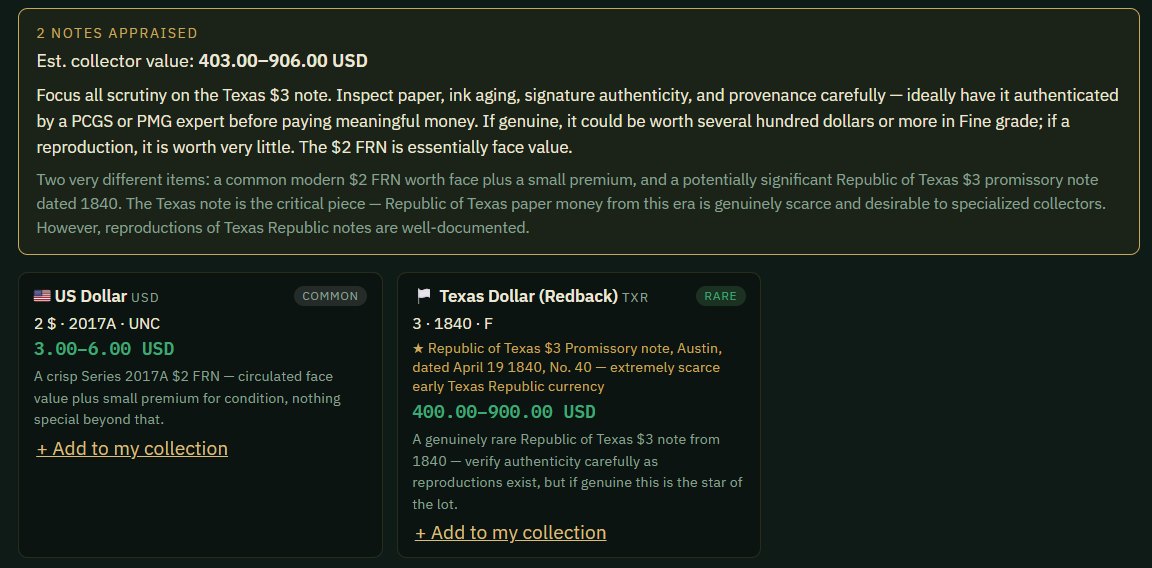
Photograph a note — or a whole lot spread across the table — and get a read on each one: country, denomination, year, grade, rarity, and an estimated collector range. The notes worth your attention get flagged; the common ones get called common.
Save the find with the asking price and where you saw it, then add the keepers straight into your collection with the photo already attached.
The ledger
Built around how collectors actually work — by country, by note, by what each one cost and what it might be worth now.
Serial, date, grade, Pick number, variety, what you paid, provenance and your own notes — kept per note, not just per country.
Front and back images stored with each note and carried along if you move it between holdings or correct the currency.
See how much of the world you've actually covered. Historical notes fold into the modern country, so a pengő counts for Hungary.
Face value converted at live rates, with collector estimates tracked separately — so you can tell the two apart.
Hundreds of currencies, live and defunct, with the history behind them — pengő, sucre, reichsmark, Soviet ruble.
Publish a read-only view of the collection with a link, with values shown or hidden as you prefer.
How it works
A username and password. Your collection syncs privately across every device you sign in on.
Pick the country and denomination, add as much or as little detail per note as you like, and attach photos.
At a shop or show, photograph what's on offer and get a read on it, with the asking price saved alongside.
Value history, world completion, and a printable report for insurance and records.
Anywhere you collect
Currency Vault runs in the browser and installs to your device — full screen, its own icon, and your collection readable even without a signal, which matters at a show.
Open in Safari, tap Share, then Add to Home Screen.
Open in Chrome and tap Install app when prompted, or from the ⋮ menu.
Chrome or Edge — click the install icon in the address bar.
Questions
Currency Vault estimates a collector value range from a photograph, taking account of the country, denomination, year and apparent grade, and flags which notes in a lot are worth a closer look. Treat it as triage rather than an appraisal: anything genuinely valuable should be authenticated by a recognised grading service before money changes hands.
Yes. Hundreds of defunct currencies are included alongside circulating ones, with the history behind each — the Hungarian pengő, the Ecuadorian sucre, the Reichsmark, the Soviet ruble and German Notgeld among them. Historical holdings still count towards your world completion under the modern country.
Once installed, the app opens and your collection stays readable without a signal, which matters at a show or a market. Live exchange rates and photo appraisal need a connection.
Your collection is tied to your own account and is not visible to anyone else. You can optionally publish a read-only showcase with a link, and choose whether values are shown or hidden on it.
Currency Vault is free to use.
Free to use, and your collection is private to your account.